
Review: titles, descriptions, SKUs and photos
Check and change everything Launch Desk prepared before it goes to your store, or ask for a fresh version.
On this page
Before you start
- Anyone on your store's team can do this.
- Plans: All plans. Credits: Editing and Rewrite are free.
Steps
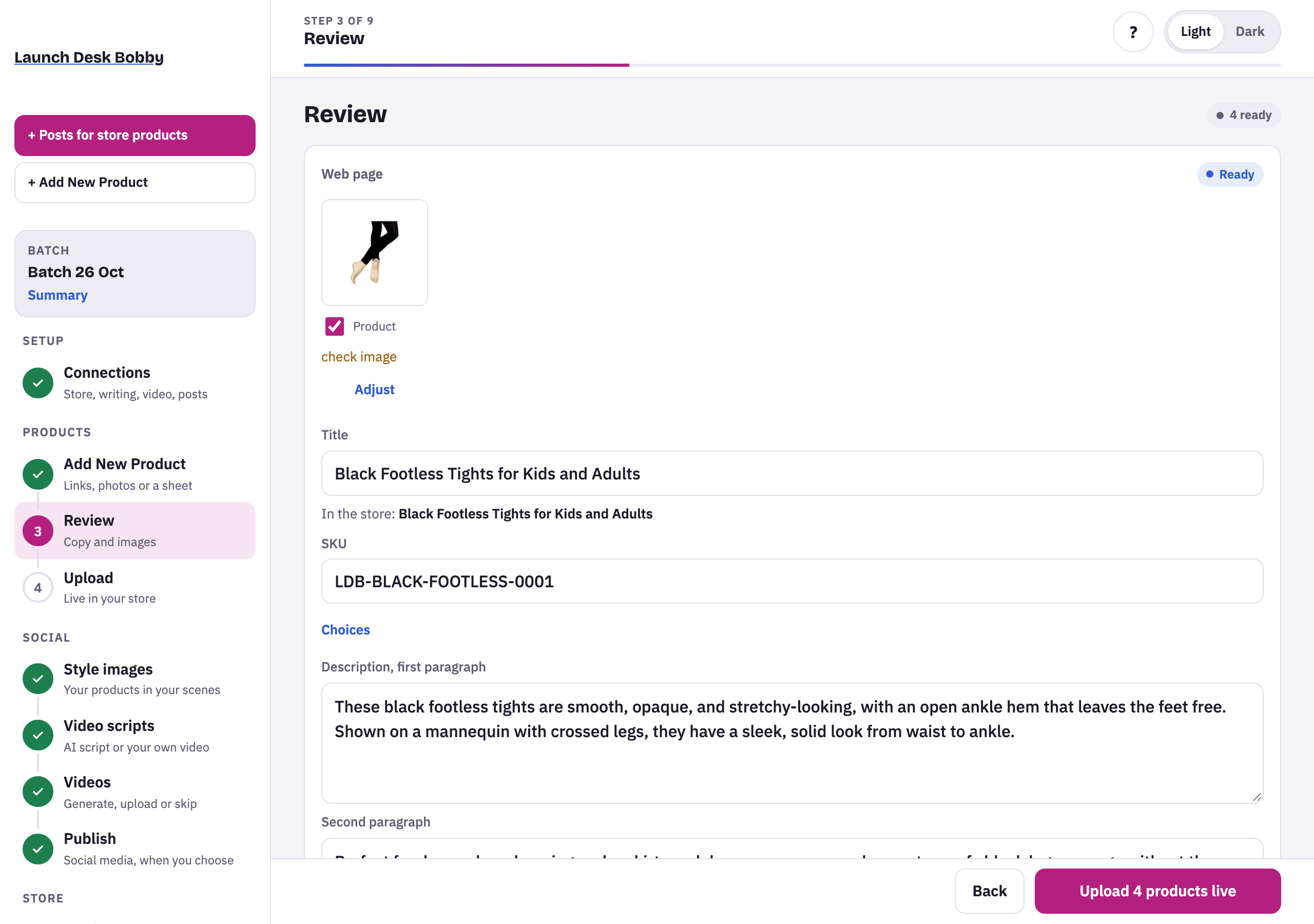
Each product’s card has:
- Photos: tick the ones to upload; Adjust changes how a photo is framed.
- Title, and SKU (yours, the supplier’s, or one made for you).
- Choices, when the product comes in colors or sizes.
- Description, first paragraph and Second paragraph, then the specs.
- SEO and image descriptions: the search title and description, and what each photo shows.
Press Rewrite for a fresh version of the text. When everything’s right, press Upload at the bottom.
Tips and limits
TipIn the store: under the title shows the title as it will appear, with any pre-order mark.
TipFields save when you click away.
LimitThe SKU and choices can't be changed after upload.
If something goes wrong
Couldn't prepare
The product couldn't be read or its photos couldn't be used. The reason is shown; press Try again, or add it by hand.
Already in store
A product with the same SKU is already in your store. It won't be uploaded twice.
check image
A photo is small or cut off at the edge. Hover to see why; untick it or use a sharper photo.





















