
Team, sign-in and roles
Give your staff access to Launch Desk through Shopify, choose who's an owner, and see how many staff your plan includes.
On this page
Before you start
- You need to be the store's owner in Launch Desk (staff can't do this).
- Plans: All plans (staff places: Starter 1, Basic 3, Growth 5, Pro unlimited). Credits: None.
Steps
People sign in to Launch Desk with their own Shopify admin account. Opening Launch Desk from your Shopify admin (Apps › Launch Desk) signs them in straight away. There are no separate passwords or invitations.
Add someone
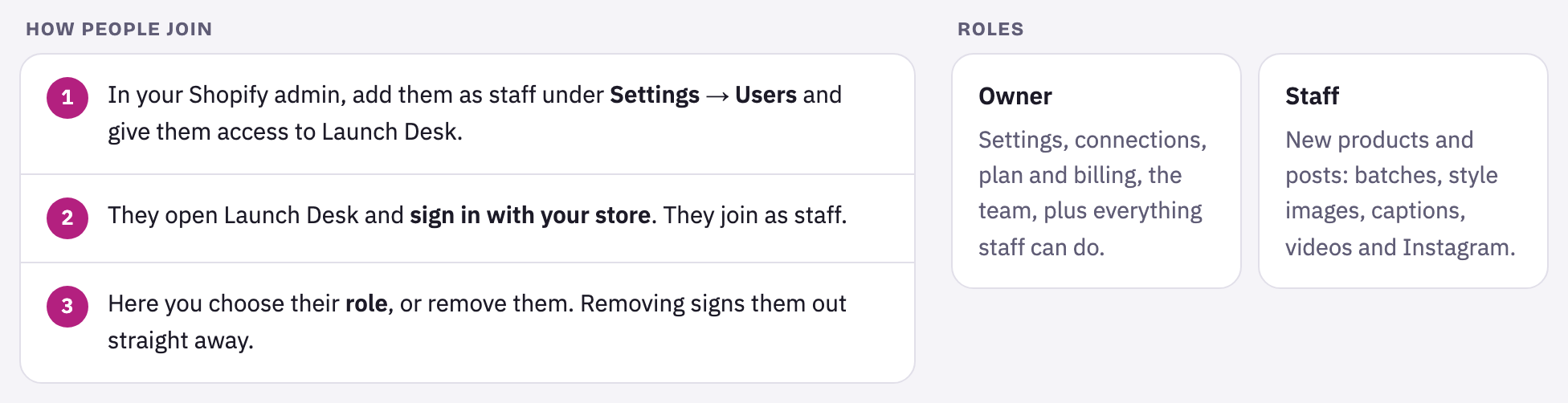
- In your Shopify admin, add them as staff under Settings › Users and give them access to Launch Desk.
- They open Launch Desk and sign in with your store. They join as staff.
- In Launch Desk, open Team to change their role, or remove them.
Owners and staff
- Owners see everything, including Connections, Settings, Team and Plan & billing. The person who owns the Shopify store, or the first person to use Launch Desk, is an owner.
- Staff make new products and posts: batches, style images, captions, videos and publishing. If something in Connections or Settings needs changing, they ask an owner.
Staff on each plan
Owners don’t count. Starter includes 1 staff member, Basic 3, Growth 5 and Pro unlimited. Someone who already belongs to your team keeps access if you change plan.
Tips and limits
If something goes wrong
This store's … plan allows … staff members. Ask an owner to upgrade, or to remove someone in Team.
Your plan's staff places are used. Remove someone in Team, or change plan in Plan & billing.
This store hasn't added Launch Desk yet. Install it from Shopify first, then open it from your store admin.
The person is signing in to a store that hasn't installed Launch Desk. Install it first, then open it from Apps in Shopify.
The sign-in expired. Try again.
Open Launch Desk again from your Shopify admin (Apps › Launch Desk).





















