

You don’t need a new product to have something worth posting. Most of a store’s sales come from products it already has: best sellers, evergreen items, restocks and seasonal favorites. Give those products fresh images, short videos and clear captions, schedule them across the month, and your feed stays active without a single new launch.
This guide shows how to plan a month of posts from your existing catalog, what to say about products people may have seen before, and how to make the content quickly, including with Launch Desk’s Posts for store products.

Products already in the store, given new studio images. Same products, new reasons to stop scrolling.
Why your existing catalog is your best content source
New products are exciting, but they’re rare. If your social media only moves when something new arrives, your feed goes quiet for weeks at a time, and quiet accounts lose reach.
Your existing products have advantages new ones don’t:
- Proven demand. Best sellers already convince people. Showing them to new audiences is low risk.
- Real questions. You know what customers ask about them: size, scent, how to use them, what they pair with. Every question is a post.
- Reviews and photos. Existing products have feedback you can reference (with permission, and only real reviews).
- Stock you need to move. Slow movers and overstock benefit most from a fresh look.
The trick is to present familiar products in new ways, so even people who’ve seen them notice them again.
Step 1: Choose the products for the month
Pick 12 to 20 products for a month. A balanced mix:
| Group | How many | Why |
|---|---|---|
| Best sellers | 4–6 | Proven, reliable reach and sales |
| Evergreen basics | 3–4 | Everyday products people reorder |
| Seasonal picks | 2–4 | Timely: holidays, weather, events |
| Restocks and back in stock | 1–3 | Built-in urgency |
| Slow movers worth a push | 2–3 | A new angle can change their story |
Look at your Shopify analytics for the first two groups, your calendar for the third, and your inventory for the last two.
Step 2: Give each product a fresh look
The fastest way to make a familiar product feel new is a new setting. A hair wash on a bathroom shelf in one post and on a mountain rock at sunrise in the next tells two different stories about the same bottle.
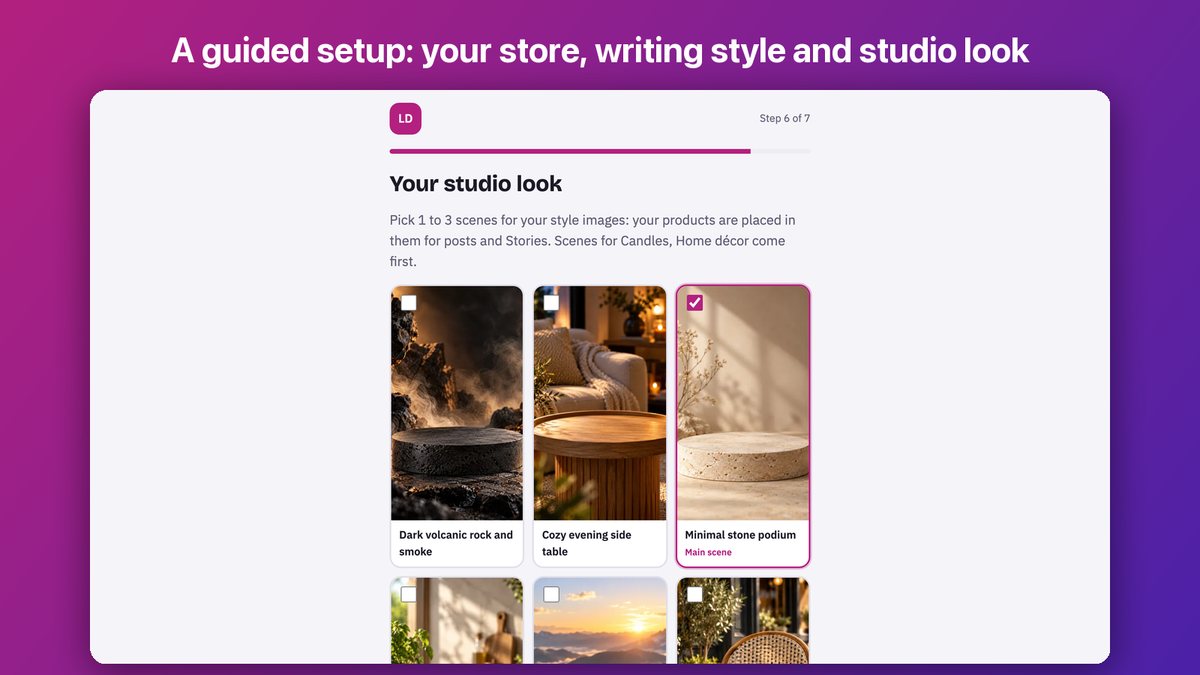
Choose your studio look once; every product’s style image follows it.
Ideas that work for existing products:
- Seasonal scenes. The same candle on a summer patio, then by a winter fireplace.
- Use and context. Juice on a breakfast table, skincare by a sink, headphones on a desk.
- Collections. Several products in matching scenes, posted as a carousel.
- Short video. A slow camera move around the product, with a bold caption.
- People. An AI presenter who talks about the product, or, for clothing, an AI model who wears it.
Whatever you choose, keep the product exactly as it is. Customers who buy from a post should receive what they saw.
Step 3: Write captions with one reason to buy
A caption for a product people may have seen before needs a fresh angle. Pick one per post:
- A question customers ask: “Does it work on curly hair? Yes, and here’s why.”
- A use case: “The 3 p.m. pick-me-up that isn’t coffee.”
- A detail people miss: “The pump locks for travel.”
- A season or moment: “Cozy evenings start here.”
- Social proof: “Our most reordered product this year” (only if it’s true).
- Back in stock: “It sold out in two weeks. It’s back.”
Keep the first line short and specific; it’s all most people read. End with a clear next step: “Tap to shop” or “Link in bio.”
Step 4: Plan the month
Here’s a simple four-week rhythm for 16 posts, four a week:
| Week | Monday | Wednesday | Friday | Weekend |
|---|---|---|---|---|
| 1 | Best seller Reel | Carousel: a collection | Evergreen photo post | Story: question box |
| 2 | Seasonal Reel | Best seller, new scene | Restock announcement | Story: behind the scenes |
| 3 | Slow mover, new angle | AI presenter video | Evergreen Reel | Story: poll |
| 4 | Best seller Reel | Carousel: gift ideas | Seasonal photo post | Story: recap |
Schedule everything at the start of the month, then spend a few minutes a day replying to comments and messages. That’s where sales conversations happen.
Step 5: Make it all in one batch with Launch Desk
Launch Desk was built for new product launches, but most stores don’t launch something new every week, so it works just as well with the products you already have.
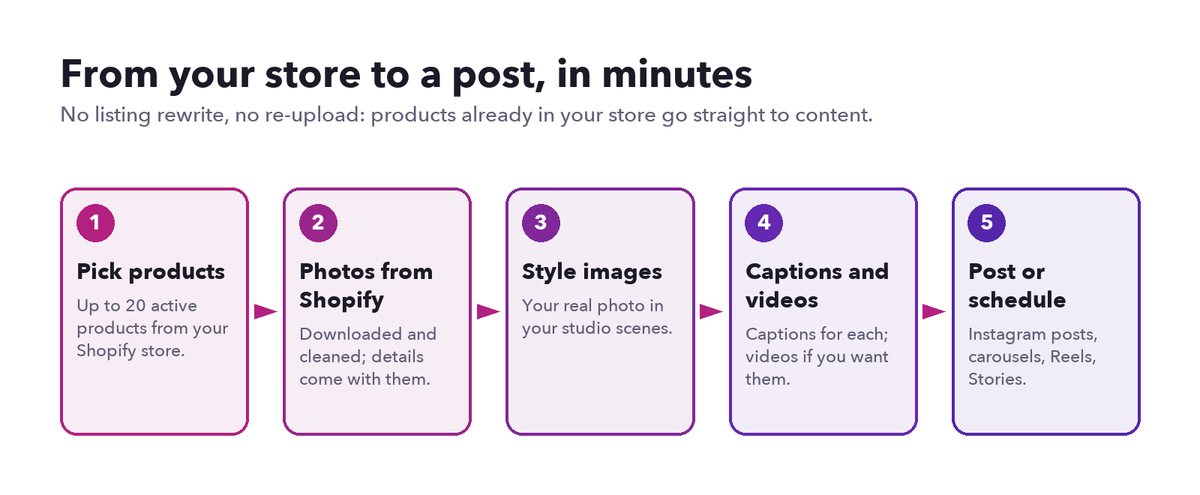
Posts for store products: from your Shopify catalog to scheduled posts, with no listing work.
Here’s how + Posts for store products works:
- Pick products. Choose up to 20 active products from your Shopify store, with search. You can include out-of-stock products if you’re planning a restock post.
- Photos and details come from Shopify. Launch Desk downloads each product’s photos and cleans them, and takes the title, short name, description, brand and store link straight from your store. Nothing is rewritten or re-uploaded to Shopify.
- Style images. Each product’s real photo is placed in your studio scenes, in 9:16 for Reels and Stories and 4:5 for feed posts.
- Captions and videos. Captions are written for every product in your store’s voice; pre-order products get pre-order captions. Add short videos, AI presenters or (on Pro) AI models if you want them.
- Post or schedule. Instagram posts, carousels, Reels and Stories, published now or scheduled. If you only want photos this month, Post this on social media skips video scripts and videos and turns your style images and captions straight into photo posts.
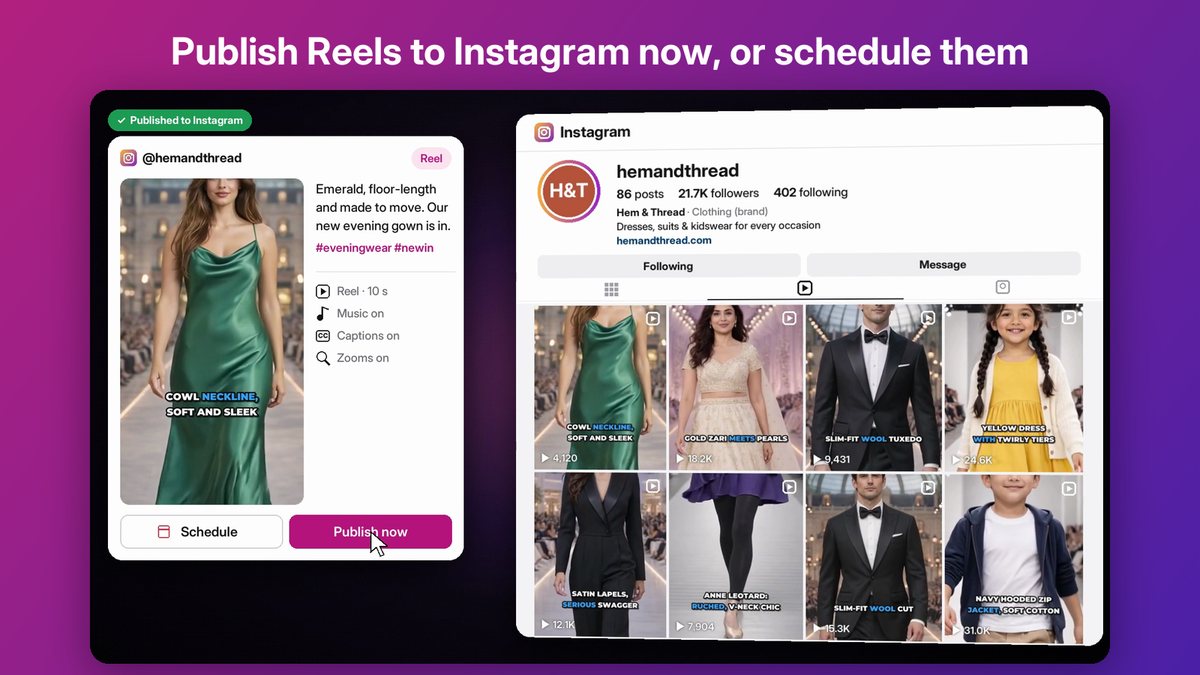
Every post is shown exactly as it will appear before anything is published.
Each store product you prepare counts as one of your plan’s monthly products: 5 on Starter, 50 on Basic, 150 on Growth and 250 on Pro. See pricing.
A worked example: a home fragrance store
A small candle and home fragrance store has 40 products and nothing new until the holidays. Here’s its month:
- Week 1: its best-selling cedar candle in a cozy evening scene (Reel), a carousel of four candles in matching scenes, and a Story asking which scent people want restocked.
- Week 2: the same cedar candle by a window in morning light (photo post), a seasonal “autumn evenings” Reel, and a “back in stock” post for a scent that sold out.
- Week 3: a slow-moving diffuser in a new spa-like scene with a caption about how long it lasts, and an AI presenter video explaining how to choose a scent for each room.
- Week 4: a gift-ideas carousel and a recap Story.
Sixteen posts, all from products that were already on the shelf, made in one sitting and scheduled for the month.
Mistakes to avoid
- Reposting the identical image. People scroll past what they’ve seen. Change the scene or the format.
- Only posting best sellers. Your feed becomes repetitive, and slow movers never get a chance.
- Captions that only say the name. Give a reason to care.
- Inconsistent looks. Random styles make a feed look unplanned. Choose a few scene styles and stick to them for a season.
- Posting and disappearing. Reply to comments; they boost reach and lead to sales.
Start this week
Pick five products, give them a fresh scene, write one-reason captions and schedule them. That’s a week of content from what you already sell.
To do it faster, install Launch Desk from the Shopify App Store and choose + Posts for store products, watch the demo, or let our managed content team do it for you. More about the feature: Posts for store products.